Every routine website maintenance task, grouped by how often to do it, with the extra checks that WordPress sites and online stores need.
A website does not look after itself. Software goes out of date, backups stop running, forms break quietly and pages slow down, usually without anyone noticing until a customer says something.
This website maintenance checklist lists the routine work that prevents all of that, grouped by how often it needs doing. It is written for WordPress and small business sites, with extra checks for online stores. If you would rather hand the list to someone else, our website maintenance services run it for you.
The short answer
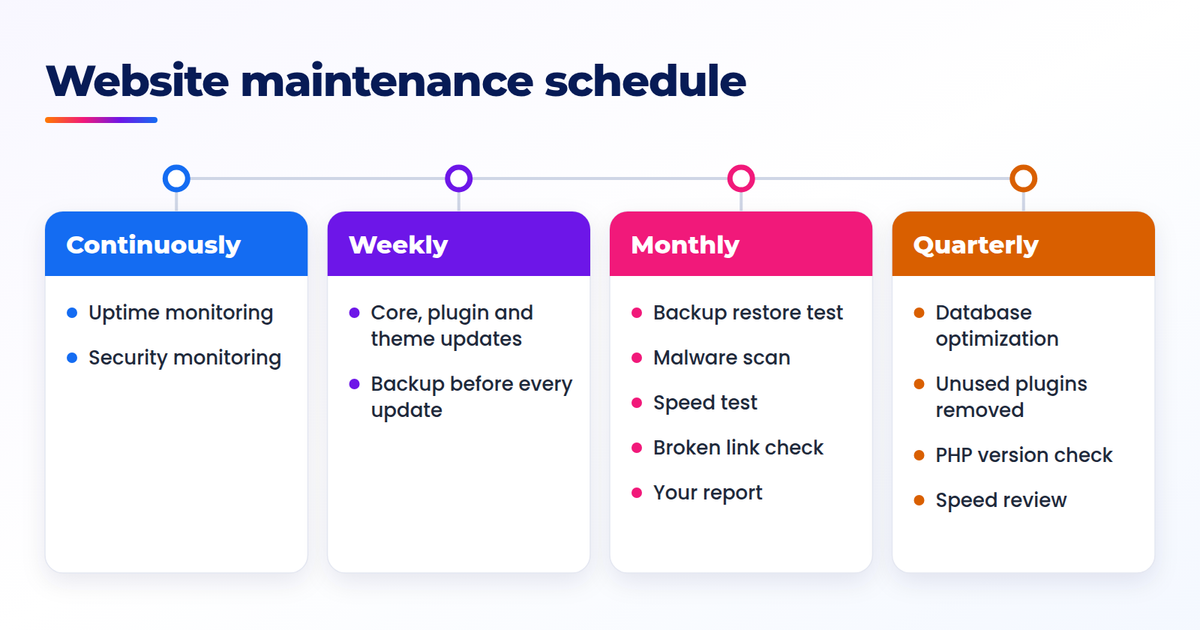
Website maintenance includes software updates, backups, security scans, uptime monitoring, speed checks and small fixes. The work follows a schedule: updates and uptime checks every week, a backup restore test, malware scan and speed test every month, and a database clean-up, plugin review and PHP version check every quarter.
The full website maintenance checklist
Here is the whole list in one table. Copy it into a spreadsheet and you have a website maintenance plan template: add one column for who does each task and another for the date it was last done.
| Task | How often | Why it matters |
|---|---|---|
| Apply core, plugin and theme updates, with a fresh backup first | Weekly | Updates close known security holes, and the backup is your way back if one breaks the site |
| Check uptime alerts | Weekly | An outage you did not notice still turned visitors away |
| Review the security scan | Weekly | A problem found early is cheaper to fix |
| Test the contact form and, on a store, one checkout | Weekly | A form that fails quietly looks exactly like a quiet week |
| Restore a backup to prove it works | Monthly | A backup that has never been restored is only a hope |
| Run a malware scan | Monthly | Infected sites often look normal to their owners |
| Run a speed test and check Core Web Vitals | Monthly | Sites slow down on their own as content and plugins build up |
| Check for broken links | Monthly | Dead links send visitors to error pages |
| Review what changed and write it down | Monthly | A written record makes the next problem easier to trace |
| Optimize the database | Quarterly | Old revisions and leftover data slow down every page |
| Remove unused plugins and themes | Quarterly | Unused code still needs updates and can still be attacked |
| Check the PHP version is still supported | Quarterly | An unsupported version stops receiving security fixes |
| Review admin accounts and remove old ones | Quarterly | Every unused login is a way in that nobody is watching |
| Review what is slowing the site down | Quarterly | Monthly tests show the trend, and this is when you act on it |
| Confirm domain and SSL renewal dates | Yearly | An expired domain or certificate takes the whole site offline |
| Review the hosting plan | Yearly | The plan that suited the site at launch may not suit it now |
| Check contact details, prices and policies are still correct | Yearly | Out-of-date details cost you inquiries and trust |
Put together, the table is a website maintenance schedule. The sections below explain each group of tasks and what to look for while you do them.
Weekly tasks
The weekly website maintenance tasks are the ones that stop small problems from turning into outages.
- Apply core, plugin and theme updates, with a fresh backup first
- Check uptime alerts
- Review the security scan
- Test the contact form and, on a store, one checkout
Take the backup before you update, not after. If an update breaks a page, the backup is how you get the working site back in minutes instead of rebuilding it.
The form test is the one people skip. A broken contact form does not show an error to you. It just stops sending inquiries, and nothing looks wrong until you count how long it has been since the last one arrived.
Monthly tasks
This is the monthly website maintenance checklist we would not skip:
- Restore a backup to prove it works
- Run a malware scan
- Run a speed test and check Core Web Vitals
- Check for broken links
- Review what changed and write it down
Restoring a backup sounds like extra work, and it is. It is also the only way to know the backup is complete. Restore it to a test location, open a few pages and confirm that recent content is there.
For the speed test, compare this month with last month and do not chase a perfect score. A site that is getting slower each month is telling you something. Our page speed optimization guide covers what to do about it.
Write down what you did, even if it is three lines in a document. When something breaks later, the record tells you what changed and when.
Quarterly tasks
Quarterly tasks are housekeeping. None of them is urgent in any one week, which is exactly why they need a date in the calendar.
- Optimize the database
- Remove unused plugins and themes
- Check the PHP version is still supported
- Review admin accounts and remove old ones
- Review what is slowing the site down
Deactivating a plugin is not the same as removing it. A deactivated plugin still sits on the server, still needs updates and can still be attacked. If you are not using it, delete it.
The admin account review matters more than it looks. Former staff, old agencies and one-off freelancers often still have logins long after the work ended. For the wider picture beyond the website, see our cybersecurity checklist for small businesses.
Yearly tasks
Once a year, check the things that are easy to forget because they only come around once a year.
- Confirm domain and SSL renewal dates
- Review the hosting plan
- Check contact details, prices and policies are still correct
Make sure the domain is registered to an email address somebody still reads. Renewal reminders that go to a former employee's inbox are a common reason a domain lapses.
WordPress maintenance tasks
A WordPress maintenance checklist is the same list with three points that need extra attention.
Three kinds of update, released separately. WordPress core, each plugin and the theme come from different developers on their own schedules. Check all three every week, because an update to one can depend on an update to another.
Plugin conflicts. Most update problems come from two pieces of software that no longer work together. Update on a staging copy of the site if you have one. If you do not, update one plugin at a time and check the site between each, so you know which update caused a problem.
Plugins first for security. Plugins are where most WordPress vulnerabilities appear. If you only have time for one WordPress maintenance task this week, make it the plugin updates.
Extra checks for online stores
A store has more ways to lose money quietly than a brochure site, so it needs three extra checks.
- Test the checkout after every update. Place a real test order from the product page through to the confirmation email.
- Check the payment gateway. Confirm that payments are arriving and that the gateway connection has not expired or been switched to test mode.
- Check product and stock data. Look for products showing the wrong price, the wrong stock level or no image.
A broken checkout costs money for every hour it stays broken, so these checks follow every update and not only the weekly routine.
Do it yourself or hand it over
Doing it yourself costs nothing but time, and it is a reasonable choice for a simple site. The risk is not the work itself. It is the week you are busy, the update that gets skipped and the backup nobody tested. If you go this way, put every task in your calendar.
Handing it over costs a monthly fee, and in return the checklist runs on schedule whether or not you are busy. You also get someone to email when a page needs a change, and a report showing what was done.
eDeskCloud runs this checklist on a schedule from $49 a month. See our website maintenance plans for what each one covers, or read our guide to website maintenance cost to see how that compares with typical prices.
Website maintenance checklist FAQ
What does website maintenance include?
Website maintenance includes software updates, backups, security scans, uptime monitoring, speed checks, broken link checks and small fixes. On a store it also includes checkout and payment gateway checks.
How often should a website be updated?
Check for core, plugin and theme updates every week, and take a fresh backup before you apply them. Security updates should not wait for the weekly run. Apply those as soon as you can test them.
How long does website maintenance take each month?
It depends on the size of the site and the number of plugins. A small brochure site needs far less time than a store with many plugins and products. The checklist above is the full list of work, so you can time it on your own site.